
How to create an email address

1. Log into your cPanel account.
2. In the "Email" section, click on "Email Accounts" icon. 

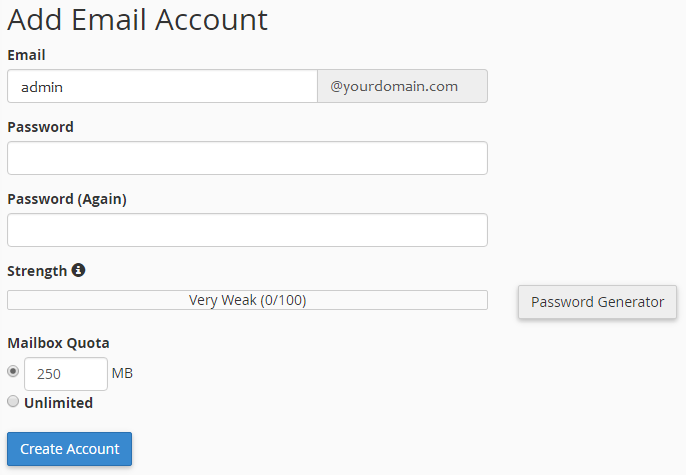
3. Enter the email address that you wish to create, such as "admin" which we use in this example.
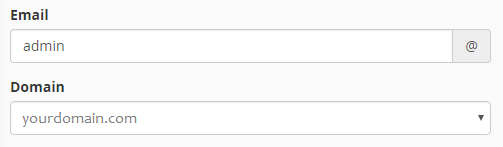
If you manage more than one domain, select the appropriate domain from the menu, as shown below.

4. Enter your new password or use a password generator to ensure it meets the complexity requirements.
5. Change the quota or leave this as it is and then click on the "Create Account" button.

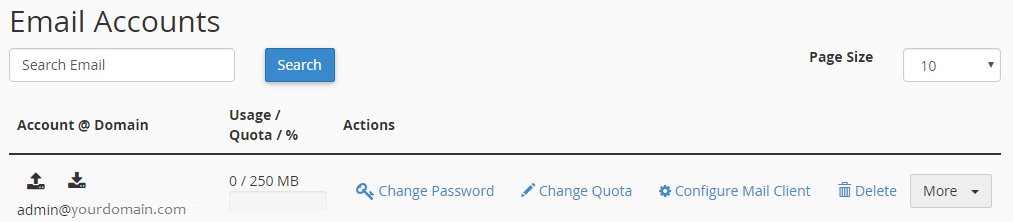
Once your email account is created, it will appear below in the "Email Accounts" section of the page.

  • 0 משתמשים שמצאו מאמר זה מועיל
?האם התשובה שקיבלתם הייתה מועילה

מאמרים קשורים

How to forward email to Gmail, Yahoo or other email service providers

Email Account Forwarders:1. Login to your cPanel account.2. In the "Mail" section of your cPanel,...

How to access your email account from cPanel Webmail

1. Open http://example.com/webmail, replace "example.com" with your domain name and enter your...

How to change the password of your email account

1. Log into your cPanel account. 2. In the "Email" section click on "Email Accounts" icon. 3....

How to create an email autoresponder when you are unavailable

If you are going for a holiday or will be unavailable for few days or a month, you can create an...

Powered by WHMCompleteSolution